
tre-blog-central revealed!
After the atrocious reveal of TRE Bothered-BED-lam - for your twisted-enjoyment and utter horror-fix-of-the-day - (and against my better judgement) here is yet another shocking revelatory peek into the low-tech cyber-sweat-shop that which is TRE-BLOG-CENTRAL! = Shown here anchored by a singular narrow desk (tis not even actually a proper desk per-se, but rather a pre-loved IKEA console-table) which serves as both computer work-top and photo-taking stage - where disposable pop culture and pretty pieces of plastics are peddled and churned out daily-ish on the multiples of TRE-blogs! Behold thy horror!

You will notice two Macs = Mac-A is the primary station for web-surfing, photoshopping and creation of rudimentary graphics, and basic iMovie video-edits etc = a G4 running on OS.X - while Mac-B is my "back-up" G3, still running on OS.9 (recently resuscitated) - and becoz it still has the back-dated software needed to download images from my equally out-dated digital camera, it remains operational, even tho the screen has already turned to shitte. So the long and short of it is: (1) Take pictures, (2) Download pics unto Mac-B, (3) Attach and email to myself from Mac-B, (4) Open email and download on Mac-A. (5) Process for publishing/posting online. Shockingly backwards, I know... :p
Used to be able to bypass the email on Mac-B by utilizing a thumb-drive to save from B then transfer to A, but has since died (actually, technically it's not even my own drive...) ANYways ...

 So whenever I attempt to take any "studio"-pictures (even I giggle at that false notion), I'd haveta shift / remove the keyboards (laying it atop the dusty screen), so I can lay down my white or black card unto the desktop! And I have a coupla extendable aluminum-poles (unseen) suspended above (between two-shelves) - where I've cable-tied a makeshift top-light box, primarily for photo-taking (I personally like the harsh-top light look :p). And please do ignore the horrendous pile of plastic figures on image-left - that's the closest staging area I have, besides my bed, of coz :p
So effectively, when I'm taking pictures, I can't blog, and visa versa. So now you know. The mystery is teh solved and blog-life continues once again! ... Ain't out looking for sympathy, just thought to share (and yes, please do feel free to laugh-out-loud or grimace) heh.
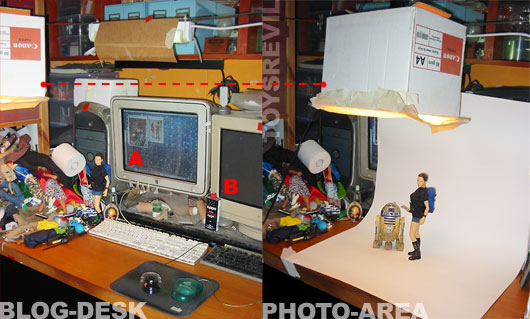
You will notice two Macs = Mac-A is the primary station for web-surfing, photoshopping and creation of rudimentary graphics, and basic iMovie video-edits etc = a G4 running on OS.X - while Mac-B is my "back-up" G3, still running on OS.9 (recently resuscitated) - and becoz it still has the back-dated software needed to download images from my equally out-dated digital camera, it remains operational, even tho the screen has already turned to shitte. So the long and short of it is: (1) Take pictures, (2) Download pics unto Mac-B, (3) Attach and email to myself from Mac-B, (4) Open email and download on Mac-A. (5) Process for publishing/posting online. Shockingly backwards, I know... :p
Used to be able to bypass the email on Mac-B by utilizing a thumb-drive to save from B then transfer to A, but has since died (actually, technically it's not even my own drive...) ANYways ...
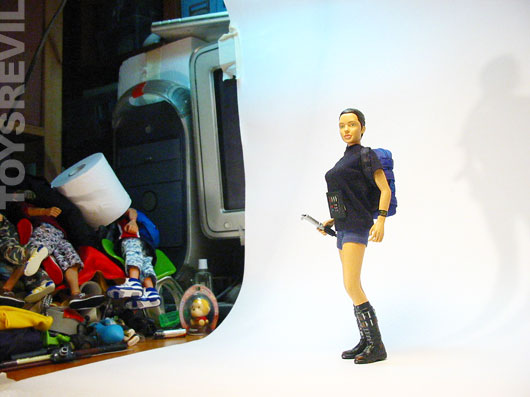
 So whenever I attempt to take any "studio"-pictures (even I giggle at that false notion), I'd haveta shift / remove the keyboards (laying it atop the dusty screen), so I can lay down my white or black card unto the desktop! And I have a coupla extendable aluminum-poles (unseen) suspended above (between two-shelves) - where I've cable-tied a makeshift top-light box, primarily for photo-taking (I personally like the harsh-top light look :p). And please do ignore the horrendous pile of plastic figures on image-left - that's the closest staging area I have, besides my bed, of coz :p
So effectively, when I'm taking pictures, I can't blog, and visa versa. So now you know. The mystery is teh solved and blog-life continues once again! ... Ain't out looking for sympathy, just thought to share (and yes, please do feel free to laugh-out-loud or grimace) heh.


What's the idea of a box lite. Is it just a box lined with tinfoil?
ReplyDeleteIt's nice to see how you do it. I've contemplated something like that for the pic taking too.
ReplyDeleteOH PLEEEEASE! Such a SHOW OFF! Us NERDS always love to showoff our MAD SKILLS on the CRUDE BUDGET! LOL! OH! JOY! I should be so brave as to show my work space. Ha! Ha! Grinn!
ReplyDeleteXXX
Bethfsh
ethan = i use it to concentrate the light source without spilling over other areas. it's like when you turn on a lightbulb and the light fills the room - so i wanna control that light.
ReplyDeletehave thought of using tin-foil, but am afraid the heat might be too much! what i've done (but not shown) was to cut holes above the box, so there's air.
or maybe i should just get a bigger box LOL
the opening of the box below is covered with trace, or tracing paper - to soften the light-spill.
savage = give it a go! i started out wanting to have fun with it myself LOL
beth = "show off"? nothing to show-off at all! LOL ... wow - never crossed my mind it would come across as such tho :( ... i'd rather show off my toy-collection than the trenches and my dismal "skills" (as it were) ... im just a simple fanboy :p
okay, now i wanna see your workspace!
or you can join these:
http://flickr.com/groups/lifeatwork/
http://flickr.com/groups/whatamess/
i've started them by the way. so have fun! LOL
just curious, wat camera are u using? :)
ReplyDeleteHa! I may take u up on that flickr challenge. Soon. Scary tho!
ReplyDeleteBethfshn
That looks about right to me! Thanks for sharing!
ReplyDeleteCool post Andy, thnx for the tips. But what's about the toilet paper on the left??
ReplyDeletetw = tis a powershot
ReplyDeleteBethfshn = that's why i startd the flickr-groups - for like-minded folks who'd not judge LOL - too much anyways muahahaha
tis always scary to open yourself up for judgement by the anonymous masses...
idlechimp = cheers duder :)
Yiao = what do YOU think it is for?
heya you could try investing in a card reader for your cam's card (SD i presume)
ReplyDeletepretty cheap now, a multi-card reader is like around $20?
i think that would solve the mac A and mac B to-fro process... ;)
:pam